
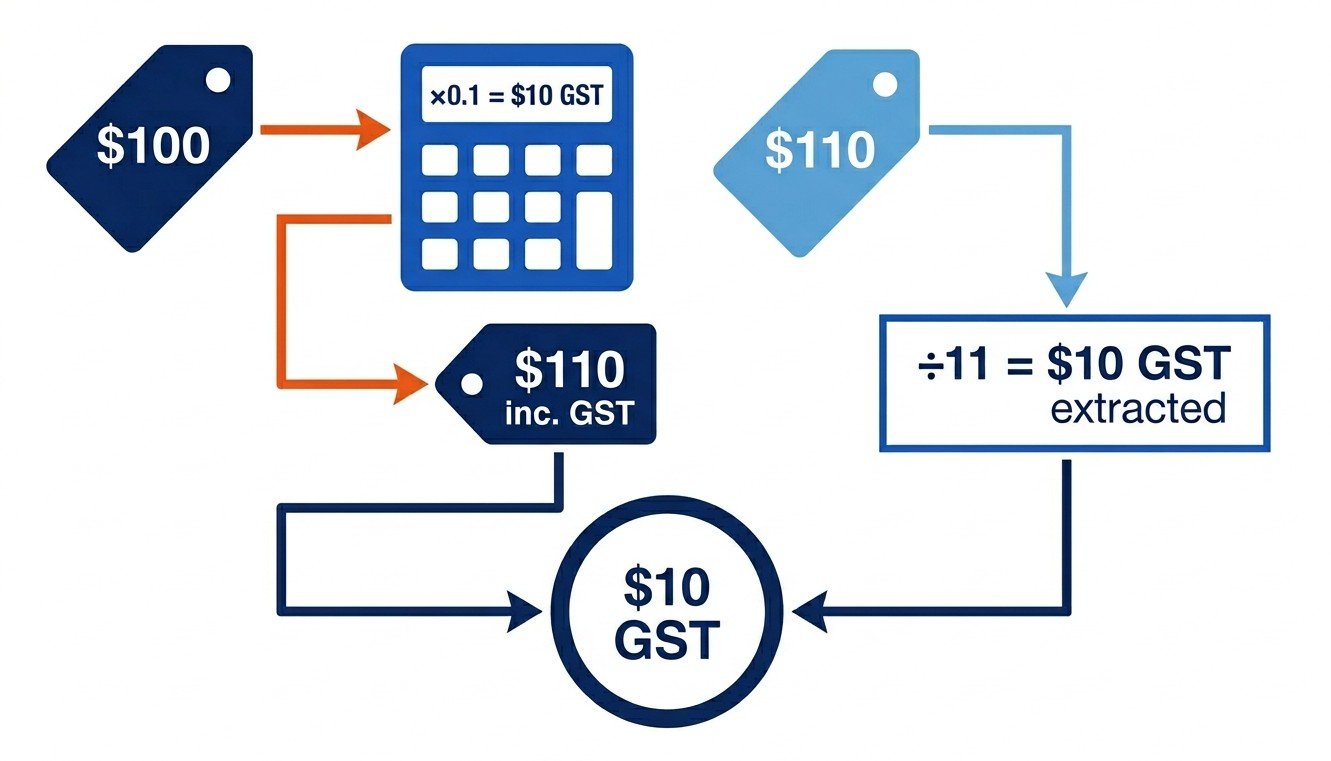
Calculating GST in Australia is two formulas, three steps and one preliminary question: are you starting from a price that already has GST in it, or one that doesn’t? Multiply by 1.1 to add GST. Divide by 11 to remove it. Get the question right and the maths is simple multiplication or division – get it wrong and you’ll be ten dollars off on a $110 invoice every time. The rest of this page walks through worked examples, the mistakes that cost the most money and the edge cases (multiple line items, imports, mixed GST and GST-free invoices).
The two GST formulas
The whole calculation reduces to four lines:
- GST amount from ex-GST price: ex-GST × 0.1 = GST
- Inclusive price from ex-GST: ex-GST × 1.1 = inclusive total
- GST amount from inclusive total: inclusive total ÷ 11 = GST
- Ex-GST price from inclusive total: inclusive total ÷ 1.1 = ex-GST
Multiplying by 1.1 (rather than 0.1) gives you the inclusive total in one step instead of two. Dividing by 11 (rather than 10) is the move that trips up most people the first time – more on that under common errors.
Step 1 – Identify whether the price is GST-inclusive or exclusive
Before you reach for either formula you need to know which side of the GST line you’re on. A few quick tells:
- Retail prices to consumers (B2C) are GST-inclusive. ACCC pricing rules require it. The price tag at Coles, Bunnings or Officeworks is what the customer actually pays at the till.
- Business-to-business quotes are usually GST-exclusive. They’ll often say ‘plus GST’ or ‘+ GST’ next to the figure, and the invoice that follows breaks out the GST line.
- The invoice itself is the giveaway. A valid AU tax invoice over $82.50 must show the GST amount separately. If you can see a GST line, the total is inclusive. If you can’t, you’re either looking at a non-tax invoice or an unregistered supplier – check the ABN.
- The ‘round number’ tell. Quoted figures that land on clean dollars ($500, $1,000, $5,000) are usually ex-GST. Inclusive prices rarely land that cleanly.
If the document doesn’t make it obvious, ask. Getting this question right saves you from running the right formula on the wrong number.
Step 2 – Apply the correct formula
The formula you apply depends on what you’ve got and what you want.
| Have | Want | Formula |
| Ex-GST price | GST amount only | ex-GST × 0.1 |
| Ex-GST price | Inclusive total | ex-GST × 1.1 |
| Inclusive total | GST amount only | inclusive ÷ 11 |
| Inclusive total | Ex-GST price | inclusive ÷ 1.1 |
For most real-world calculations you want both pieces – the GST line and the total – so the second and fourth rows do the work. The other two rows are useful when you’re filling in a single field on a form or BAS label.
Step 3 – Verify the result
The cheapest sanity check is built into the formulas: GST + ex-GST should equal the inclusive total. If those three numbers don’t reconcile, one of them is wrong.
Run the inverse to double-check. If you added GST to get an inclusive figure, divide that figure by 11 – the result should equal the GST you added. If you reversed GST out of a total, multiply the ex-GST result by 1.1 – it should match the original total. Two seconds, catches most arithmetic mistakes.
If you don’t want to do it by hand, our GST calculator runs both directions in one click.
Worked example 1 – Adding GST to a quote
Say a Sydney photographer quotes $850 ex-GST for a half-day wedding shoot. To convert that to a GST-inclusive figure for the client:
- GST amount = $850 × 0.1 = $85
- Inclusive total = $850 × 1.1 = $935
- Verification: $850 + $85 = $935 ✓
The quote line reads ‘$850 + $85 GST = $935 inc. GST’. That removes the ambiguity for the client and gives them the GST figure they’ll need if they’re claiming credits.
Worked example 2 – Extracting GST from a tax invoice
A bookkeeper hands you a $440 GST-inclusive Officeworks Print invoice for printed flyers. To split it for your BAS:
- GST = $440 ÷ 11 = $40
- Ex-GST = $440 ÷ 1.1 = $400
- Verification: $400 + $40 = $440 ✓
The $40 lands on BAS label 1B (GST credits on purchases). The $400 is the deductible expense for income tax.
Worked example 3 – The classic $1,100 transaction
The textbook example, both directions, side by side.
Forward (adding GST to $1,000):
- GST = $1,000 × 0.1 = $100
- Inclusive total = $1,000 × 1.1 = $1,100
Reverse (extracting GST from $1,100):
- GST = $1,100 ÷ 11 = $100
- Ex-GST = $1,100 ÷ 1.1 = $1,000
The reason the $1,100 example shows up everywhere is that all the numbers come out clean. Real invoices rarely behave this way – more often you’re looking at a $437.65 inclusive total that breaks into $39.79 GST and $397.86 ex-GST. The formula doesn’t change.
Common errors to avoid
Two mistakes account for most of the wrong numbers we see.
- Multiplying by 0.1 when you wanted 1.1. You end up with the GST line ($10 on a $100 ex-GST price) instead of the inclusive total ($110). The give-away: the result is too small for a total and too big for a discount.
- Dividing by 10 instead of 11. The classic. 10% off $1,100 is $990, but the actual ex-GST figure is $1,000 – a $10 error on a single transaction, which scales fast across a quarter of receipts. The reason: GST sits on top of the ex-GST price, so the inclusive total is 110% of the underlying figure, not 100% with 10% added separately.
- Per-line vs total rounding drift. Xero and MYOB round at the line level by default; a manual spreadsheet might round on the total. The two methods can differ by a cent or two on long invoices, which the ATO accepts as long as you’re consistent.
- Calculating GST on input-taxed or GST-free supplies. Residential rent is input-taxed. Basic food at Coles is GST-free. Adding GST to either is wrong, not a rounding issue.
When in doubt, run the inverse formula on your answer and check the numbers reconcile.
Calculating GST on multiple line items
A real invoice rarely has one line, and the moment GST and GST-free items appear together the maths needs to stay per-line.
Say a café invoices a corporate client for catering: $40 of bread and pastries (GST-free), $80 of cooked sandwiches (taxable) and $30 of coffees (taxable). The GST only attaches to the cooked items:
- Bread and pastries: $40 GST-free, $0 GST
- Sandwiches: $80 × 0.1 = $8 GST
- Coffees: $30 × 0.1 = $3 GST
- Subtotal ex-GST: $150
- Total GST: $11
- Invoice total: $161
Bundling everything together and multiplying by 1.1 gives $165 – $4 too high, because you’ve added GST to the GST-free bread. In Excel or Google Sheets, the cleanest pattern is a column that flags each line as taxable or GST-free, then a SUMIF for the GST calculation:
- Total taxable (ex-GST): =SUMIF(C:C, “Taxable”, B:B)
- Total GST: =SUMIF(C:C, “Taxable”, B:B)*0.1
- Total invoice: =SUM(B:B)+SUMIF(C:C, “Taxable”, B:B)*0.1
Calculating GST on imported goods
Imports follow a different path because GST is applied to the customs value, not the foreign sale price.
Goods over $1,000 customs value. Australian Border Force calculates GST on (customs value + duty + transport + insurance). Example: a business imports $5,000 of stock with $250 duty and $400 freight and insurance. GST = ($5,000 + $250 + $400) × 0.1 = $565. Border Force collects it at the time of import and the business claims it back on its next BAS.
Low-value imported goods (under $1,000). Since 1 July 2018 overseas suppliers selling to Australian consumers must register and charge GST themselves once they sell over $75,000 a year into Australia. That’s why an Amazon US order arrives with GST already added at checkout – you don’t need to recalculate, but keep the invoice as a tax record if you’re claiming credits.
Imported services and digital products. Same logic for Netflix, Adobe Creative Cloud or any offshore SaaS. The supplier collects GST and remits it. The figure on the invoice is already inclusive.
FAQs
What is the formula to calculate GST in Australia?
Two formulas cover every scenario. To add GST: ex-GST price × 1.1 = inclusive total. To remove GST: inclusive total ÷ 11 = GST amount, or inclusive total ÷ 1.1 = ex-GST price. The rate has been 10% since 1 July 2000, so the formulas don’t change.
How do you calculate 10% GST from a total?
Divide the inclusive total by 11. So $220 ÷ 11 = $20 of GST, leaving $200 ex-GST. The reason it’s ÷ 11 and not ÷ 10 is that the 10% has already been added on top, which makes GST 1/11 of the inclusive total rather than 1/10.
How do I work out GST on $100?
Depends on whether the $100 is ex-GST or inclusive. If it’s ex-GST: GST is $100 × 0.1 = $10, inclusive total $110. If it’s inclusive: GST is $100 ÷ 11 = $9.09, ex-GST $90.91. The classic mistake is treating $100 as ex-GST when it’s already inclusive – check the invoice or quote first.
Is GST 10% or 1/11?
Both, depending on which side you’re starting from. GST is 10% of the ex-GST price (the smaller figure) and 1/11 of the GST-inclusive total (the larger figure). They describe the same dollar amount from two angles.
How do I calculate GST from a gross amount?
The gross amount is the GST-inclusive total. Divide by 11 to get the GST line, divide by 1.1 to get the ex-GST figure, or subtract the GST from the gross to get the same thing. All three approaches give the same answer.
Can I claim GST credits?
Only if you’re registered for GST and the purchase was for your business. Claim the GST portion (1/11 of the inclusive cost) on BAS label 1B. You can’t claim credits on input-taxed purchases (residential rent, financial services) or on personal expenses dressed up as business – the ATO checks this regularly.
The calculators and guides on gstcalculator.net.au are for general information only and do not constitute tax, financial, or legal advice. Consult a registered tax agent for advice specific to your situation.